Robotics Episode Review 🔒
This template creates a robotics episode review Interface for inspecting autonomous policy rollouts side-by-side with their captured video streams.
Annotators step through the episode, score overall execution quality, and refine the timeline of subtasks, mistakes, subgoals, and coaching notes that ML and robotics teams use to evaluate policy performance.
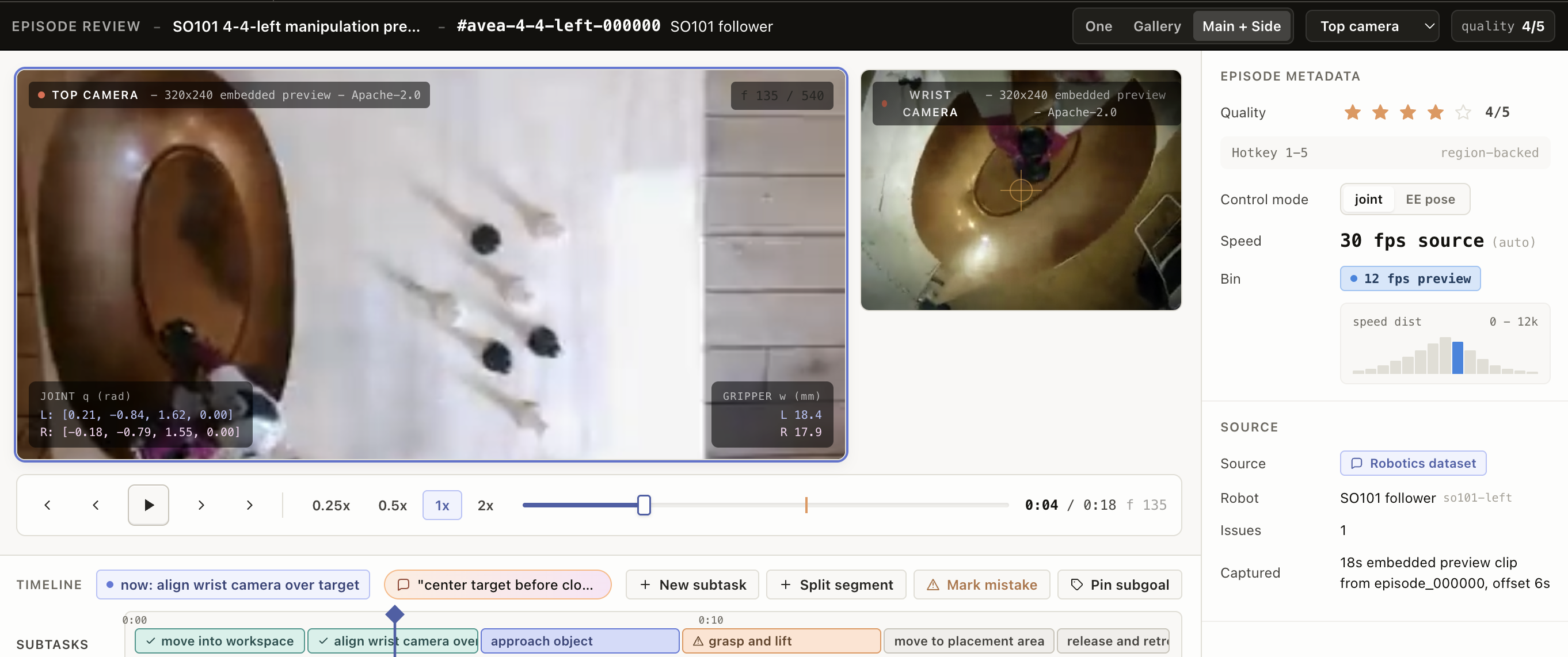
The example Interface includes:
- Multi-camera video panel with a selectable main view (top, wrist, etc.) and three layout modes: single, gallery, and main + side.
- Transport controls with play/pause, frame step, speed (0.25x - 2x), and a scrubber overlaying mistake markers.
- Timeline panel rendering subtask segments, mistake flags, subgoals, and coaching prompts with click-to-seek and color-coded segment status.
- Metadata panel with a 1-5 star quality rating, control mode, speed bin, source, robot ID, issue count, and capture date.
- Segment editing so annotators can add a new subtask, split the current segment at the playhead, mark a mistake, or pin a subgoal from the timeline toolbar.
Enterprise
Interfaces can only be used in Label Studio Enterprise and Starter Cloud.
note
To use template Interfaces, you must first create an editable copy of the Interface. From Interfaces >Templates, select the overflow menu next to the template you want to use and click Duplicate.
Interface UI
The interface is divided into three regions plus a fixed header.
Header bar
Displays the episode title, episode ID, and robot name, alongside three controls:
- A layout toggle for switching between One, Gallery, and Main + Side.
- A Main video dropdown (shown for the One and Main + Side layouts) to choose which camera occupies the primary viewport.
- A quality readout (for example,
quality 4/5) that stays in sync with the star rating in the metadata panel.

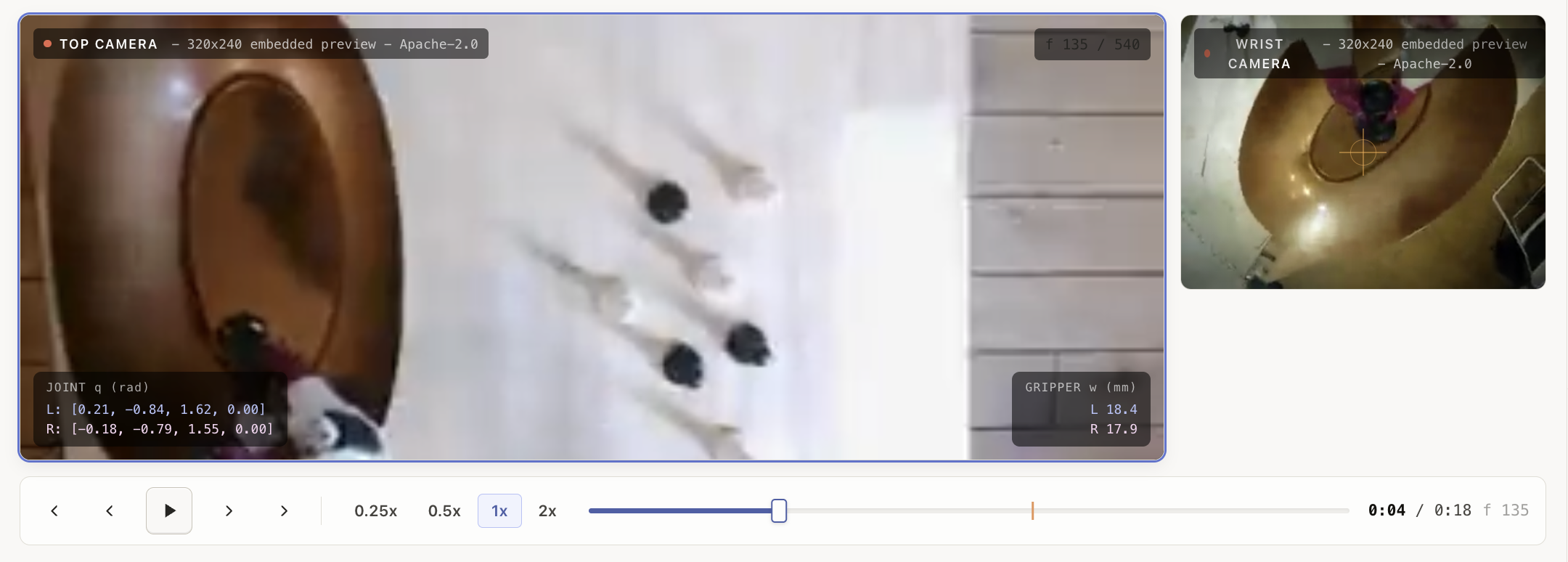
Video panel
Renders the selected camera feeds and a transport bar. While the episode is playing or being scrubbed, an active mistake within five seconds of the playhead is highlighted with an overlay that shows the mistake label and severity.
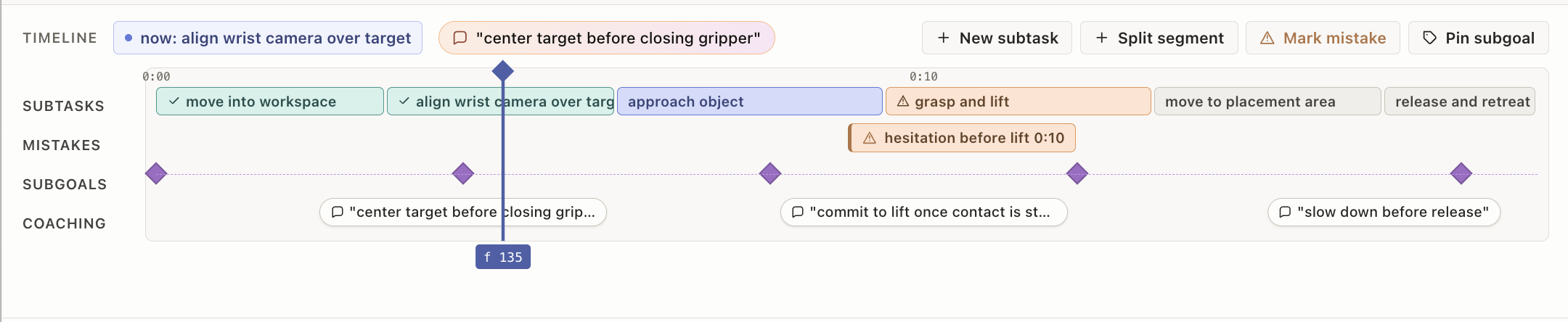
Timeline panel
Shows the current subtask (now: <name>) and any coaching prompt that fires at the current time. Four toolbar buttons let annotators edit the timeline:
- New subtask inserts a new segment starting at the playhead.
- Split segment splits the current segment at the playhead into two.
- Mark mistake drops a mistake marker at the playhead.
- Pin subgoal attaches a subgoal label at the playhead.
Below the toolbar, three lanes render alongside a time ruler: a subtask lane (color-coded by status — queued, running, done, warn), a mistake/coaching lane, and a subgoal lane. Clicking anywhere on the lanes seeks the playhead to that time.
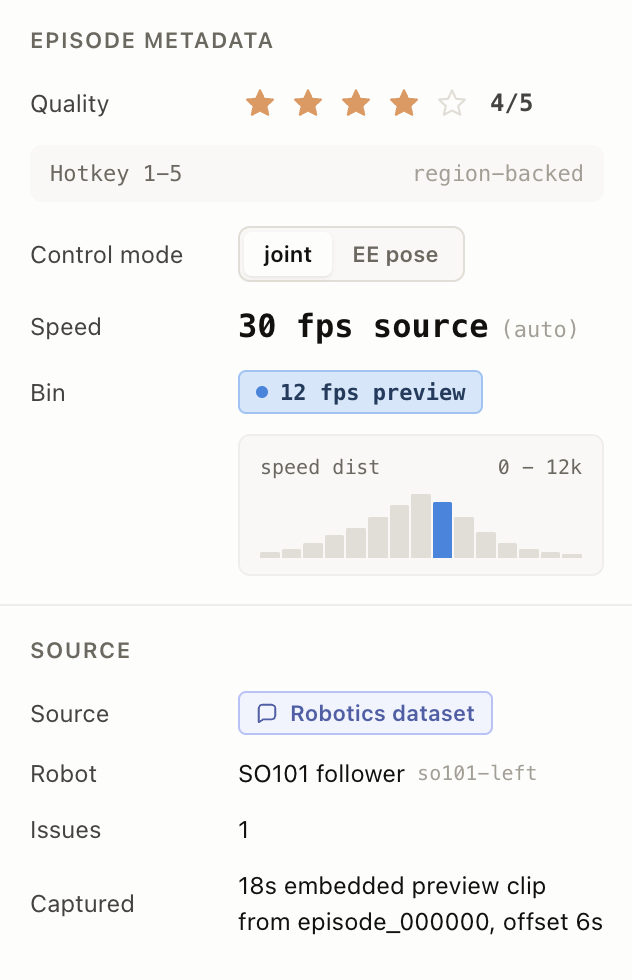
Metadata panel
A right-side rail with two sections:
- Episode metadata — A 1-5 star Quality rating (also driven by the
1-5keys), a Control mode segmented toggle (jointorEE pose), the Speed display, the Bin badge, and a small speed histogram. - Source — The Source, Robot, Issues count, and Captured date.
The Interface also responds to keyboard shortcuts: Space toggles play/pause, ArrowLeft / ArrowRight step the playhead by one second, and 1-5 set the quality rating.
React code
The full Screen.jsx source is roughly 2,600 lines, so the snippets below highlight the parts you are most likely to customize:
- The params you wire to your task fields
- The default sample data the Interface falls back to
- The segment status and color scheme
- The keyboard shortcuts
- The result shape it writes back to Label Studio
Interface params
Set or rename a param on the Interface config to point at a different task field. The defaults mirror the example input below.
const paramsSchema = {
  type: "object",
  properties: {
    episodeIdField: { type: "string", title: "Episode ID field", default: "episodeId" },
    titleField: { type: "string", title: "Episode title field", default: "title" },
    totalSecField: { type: "string", title: "Duration seconds field", default: "totalSec" },
    totalFramesField: { type: "string", title: "Frame count field", default: "totalFrames" },
    videosField: { type: "string", title: "Videos field", default: "videos" },
    subtasksField: { type: "string", title: "Subtasks field", default: "subtasks" },
    mistakesField: { type: "string", title: "Initial mistakes field", default: "mistakes" },
    subgoalsField: { type: "string", title: "Subgoals field", default: "subgoals" },
    coachingField: { type: "string", title: "Coaching field", default: "coaching" },
    defaultVideoLayout: {
      type: "string",
      title: "Default video layout",
      enum: ["one", "gallery", "main-side"],
      default: "main-side",
    },
  },
  required: ["episodeIdField", "titleField", "totalSecField", "totalFramesField"],
};
Default sample data
If a task is missing any of the optional fields (subtasks, mistakes, subgoals, coaching, videos), the Interface seeds itself from these constants.
Edit them to change the demo data, or remove them once you always send real values.
const DEFAULT_SUBTASKS = [
  { id: "1", name: "grasp shirt",         start: 0,  end: 8,   status: "done" },
  { id: "2", name: "lift to center",      start: 8,  end: 21,  status: "done" },
  { id: "3", name: "align fold",          start: 21, end: 38,  status: "warn", note: "missed crease" },
  { id: "4", name: "fold left over right",start: 38, end: 62,  status: "running" },
  { id: "5", name: "smooth + release",    start: 62, end: 92,  status: "queued" },
  { id: "6", name: "stack onto pile",     start: 92, end: 134, status: "queued" },
];

const DEFAULT_MISTAKES = [{ id: "m1", at: 30, label: "missed crease", severity: "warn" }];

const DEFAULT_SUBGOALS = [
  { id: "g1", at: 0,  label: "right hand on collar" },
  { id: "g2", at: 14, label: "shirt centered" },
  // ...
];

const DEFAULT_COACHING = [
  { id: "c1", at: 12, text: "now lift the right corner" },
  // ...
];

const DEFAULT_VIDEOS = [
  { id: "front",       label: "Front view",  view: "front",       sub: "primary - 1280x720 - 30 fps" },
  { id: "left-wrist",  label: "Left wrist",  view: "left-wrist",  sub: "640x480" },
  { id: "right-wrist", label: "Right wrist", view: "right-wrist", sub: "640x480" },
];
Segment status and colors
Each subtask carries a status drawn from SEGMENT_STATUS_OPTIONS, and segmentColor returns the swatch used on the timeline and in the Outliner. Adjust these to add a new status (for example, failed) or to rebrand the existing ones.
const SEGMENT_STATUS_OPTIONS = ["queued", "running", "done", "warn"];

function segmentColor(segment) {
  if (segment.status === "done")    return "#34988d";
  if (segment.status === "warn")    return "#e69559";
  if (segment.status === "running") return "#4c5fa9";
  return "#a49f95";
}
Keyboard shortcuts
Hotkeys live in the top-level Screen component. Add or remap a key here.
function onKey(event) {
  if (event.target && ["INPUT", "TEXTAREA"].includes(event.target.tagName)) return;
  if (event.code === "Space") {
    event.preventDefault();
    setPlaying((value) => !value);
  } else if (event.code === "ArrowLeft") {
    setT((value) => clamp(value - 1, 0, episode.totalSec));
  } else if (event.code === "ArrowRight") {
    setT((value) => clamp(value + 1, 0, episode.totalSec));
  } else if (event.key >= "1" && event.key <= "5") {
    updateReview(props, episode, { _quality: Number(event.key), _currentTimeSec: t });
  }
}
Result shape
getResults builds the annotation that Label Studio persists. It always emits one episode_review choices result plus one segment labels result per timeline segment, all attached to a single episode object — a contract you’ll want to preserve when extending the Interface.
const REVIEW_FROM_NAME = "episode_review";
const SEGMENT_FROM_NAME = "segment";
const EPISODE_TO_NAME = "episode";

function getResults(regions) {
  // Builds one reviewResult:
  //   { from_name: "episode_review", to_name: "episode", type: "choices",
  //     value: { choices: ["Reviewed"], quality, mistakes, subgoals, notes, currentTimeSec, selectedSegmentId, episodeId } }
  //
  // Plus one segmentResult per region:
  //   { from_name: "segment", to_name: "episode", type: "labels",
  //     value: { id, name, start, end, status, note, order } }
}
Example input
The Interface expects a task data object with an episode definition and (optionally) videos, subtasks, mistakes, subgoals, and coaching. Each videos[].url can be an external URL or a data:video/mp4;base64,... string for self-contained samples.
Click to expand
{
  "data": {
    "episodeId": "avea-4-4-left-000000",
    "title": "SO101 4-4-left manipulation preview",
    "robot": "SO101 follower",
    "robotId": "so101-left",
    "source": "Robotics dataset",
    "datasetUrl": "https://huggingface.co/datasets/avea-robotics/4-4-left",
    "license": "Apache-2.0",
    "captured": "18s embedded preview clip from episode_000000, offset 6s",
    "speed": "30 fps source",
    "speedBin": "12 fps preview",
    "controlMode": "joint",
    "totalSec": 18,
    "totalFrames": 540,
    "initialTime": 4.5,
    "initialQuality": 4,
    "videos": [
      {
        "id": "top",
        "label": "Top camera",
        "view": "front",
        "sub": "320x240 preview",
        "url": "https://example.com/episode_000000_top.mp4"
      },
      {
        "id": "wrist",
        "label": "Wrist camera",
        "view": "left-wrist",
        "sub": "320x240 preview",
        "url": "https://example.com/episode_000000_wrist.mp4"
      }
    ],
    "subtasks": [
      { "id": "1", "name": "move into workspace",     "start": 0,   "end": 3,    "status": "done" },
      { "id": "2", "name": "align wrist over target", "start": 3,   "end": 6,    "status": "done" },
      { "id": "3", "name": "approach object",         "start": 6,   "end": 9.5,  "status": "running" },
      { "id": "4", "name": "grasp and lift",          "start": 9.5, "end": 13,   "status": "warn",   "note": "brief hesitation before lift" },
      { "id": "5", "name": "move to placement area",  "start": 13,  "end": 16,   "status": "queued" },
      { "id": "6", "name": "release and retreat",     "start": 16,  "end": 18,   "status": "queued" }
    ],
    "mistakes": [
      { "id": "m1", "at": 10.5, "label": "hesitation before lift", "severity": "warn" }
    ],
    "subgoals": [
      { "id": "g1", "at": 0,  "label": "arm initialized" },
      { "id": "g2", "at": 4,  "label": "target centered in top view" },
      { "id": "g3", "at": 8,  "label": "gripper near object" },
      { "id": "g4", "at": 12, "label": "object lifted" },
      { "id": "g5", "at": 17, "label": "release posture reached" }
    ],
    "coaching": [
      { "id": "c1", "at": 4,  "text": "center target before closing gripper" },
      { "id": "c2", "at": 10, "text": "commit to lift once contact is stable" },
      { "id": "c3", "at": 16, "text": "slow down before release" }
    ]
  }
}
Example output
The saved annotation contains one episode_review choices result and one segment labels result per timeline segment. All results share the same to_name (episode) so they are grouped on the same logical region.
For example (partial JSON):
{
  "result": [
    {
      "id": "episode-review-avea-4-4-left-000000",
      "from_name": "episode_review",
      "to_name": "episode",
      "type": "choices",
      "value": {
        "choices": ["Reviewed"],
        "episodeId": "avea-4-4-left-000000",
        "quality": 4,
        "selectedSegmentId": "3",
        "currentTimeSec": 9.5,
        "mistakes": [
          { "id": "m1", "at": 10.5, "label": "hesitation before lift", "severity": "warn" },
          { "id": "mistake-1715515200000", "at": 12.4, "label": "review marker", "severity": "warn" }
        ],
        "subgoals": [
          { "id": "g4", "at": 12, "label": "object lifted" }
        ],
        "notes": ""
      }
    },
    {
      "id": "segment-avea-4-4-left-000000-1",
      "from_name": "segment",
      "to_name": "episode",
      "type": "labels",
      "value": {
        "id": "1",
        "name": "move into workspace",
        "start": 0,
        "end": 3,
        "status": "done",
        "note": "",
        "order": 0
      }
    },
    {
      "id": "segment-avea-4-4-left-000000-4",
      "from_name": "segment",
      "to_name": "episode",
      "type": "labels",
      "value": {
        "id": "4",
        "name": "grasp and lift",
        "start": 9.5,
        "end": 13,
        "status": "warn",
        "note": "brief hesitation before lift",
        "order": 3
      }
    }
  ]
}