Wearable Activity 🔒
This template creates a wearable activity Interface for reviewing multi-channel time-series data (heart rate, HRV, acceleration, respiration, SpO2) from a wrist-worn or chest-worn device and labeling time spans as activities, sleep stages, or ECG rhythms.
Annotators see a 24-hour context strip with auto-detected segments, zoom into a focused window of the day, scrub through synchronized sensor channels, and apply a label from one of three groups — activity, sleep stage, or ECG rhythm — to a brushed selection or a default span around the playhead. Each label writes a region with start, end, duration, and the originating task group, producing the structured time-span output health-tech and longitudinal-monitoring teams need for activity recognition, sleep staging, and rhythm review.
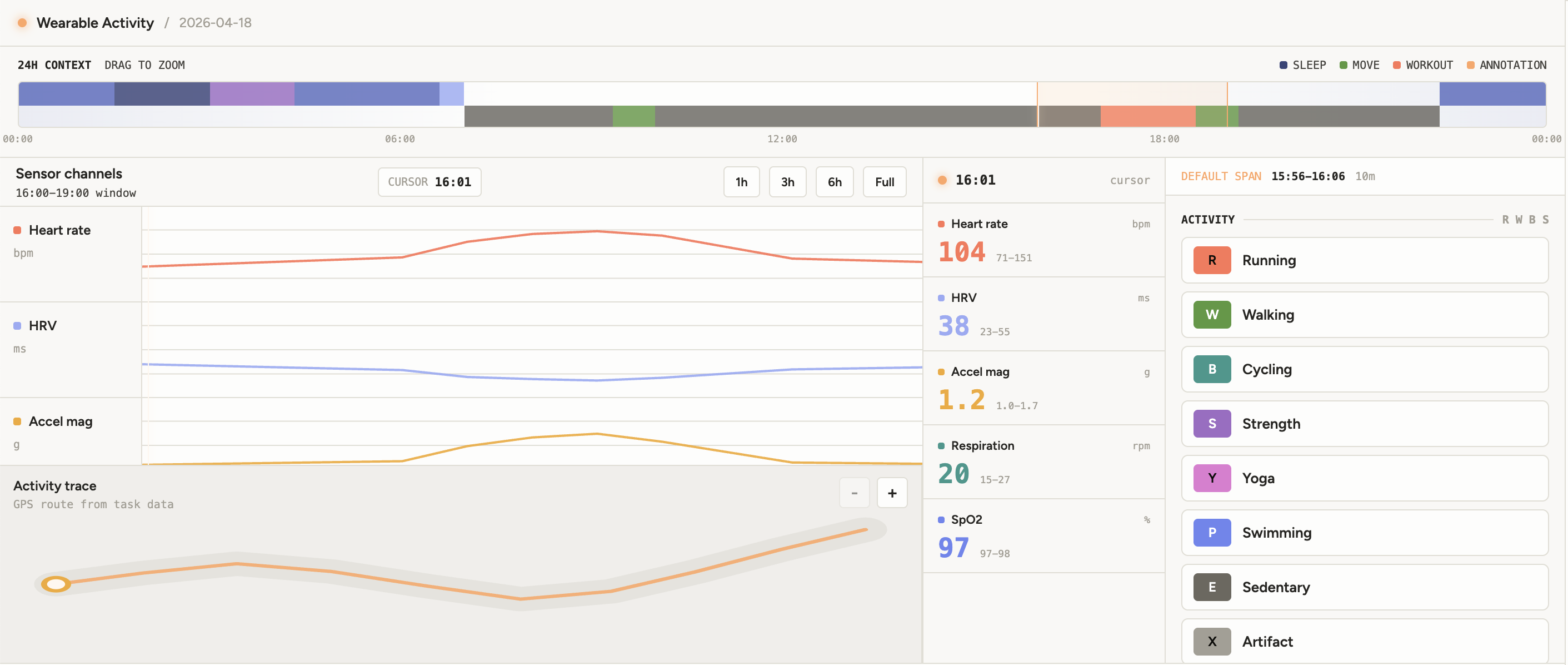
The example Interface includes:
- 24-hour context strip with auto-detected sleep and activity segments, existing annotation markers, and a drag-to-zoom brush that updates the focused window.
- Synchronized channel stack rendering up to five signal traces — heart rate, HRV, accel magnitude, respiration, and SpO2 — sharing a single playhead and selection span.
- Span brushing in the channel stack to create a time selection that the label panel applies the next label to. With no active selection, labels are applied to a default ±30 min window around the playhead.
- Side rail showing the current sample’s value per channel plus min / max / mean stats for the focused window.
- GPS route preview below the channel stack that highlights the route segment matching the current selection.
- Judgment panel on the right with three stacked label groups — Activity, Sleep stage, and ECG rhythm — each label exposed as a hotkey button.
- Configurable label groups via
activityLabels,sleepLabels, andrhythmLabels, plus a combinedlabelslist for output validation.
Enterprise
Interfaces can only be used in Label Studio Enterprise and Starter Cloud.
note
To use template Interfaces, you must first create an editable copy of the Interface. From Interfaces >Templates, select the overflow menu next to the template you want to use and click Duplicate.
Interface UI
The Interface is divided into a top header, a 24-hour context strip, a channel stack with a route preview below it, a side rail of live sample stats, and a right-side judgment panel for applying labels.
Top bar
A thin header with the template name and task context.
- Wearable Activity title and the task’s
datefield (or"24h sensor review"when absent). - Acts as a static label for the screen — no controls live here.
Context strip
A 24-hour overview bar above the channel stack.
- Auto-detected context segments from the
segmentstask field are rendered as two stacked lanes — sleep stages on top, activities on the bottom — using each segment’s label color. - Existing annotation markers appear as a third row so reviewers can see where they have already labeled.
- Drag anywhere on the strip to brush a new focused window — that span becomes the visible range in the channel stack. The current playhead position is rendered as a vertical guide.
- A small legend at the top right shows the color encoding for Sleep, Move, Workout, and Annotation swatches.
Channel stack
The main center panel — a stack of signal traces rendered for the focused window.
- Channels —
Heart rate(bpm),HRV(ms),Accel mag(g),Respiration(rpm), andSpO2(%). Each channel has its own y-axis range and color. - Playhead is shared across all channels; clicking anywhere in the stack moves it.
- Brush horizontally to create a time selection. The selection persists across all channels and is what the judgment panel applies the next label to.
- The window range can be reset or rewindowed via the context strip above.
Side rail
A narrow right-side column showing live numbers for the playhead position.
- Current sample value per channel at the playhead.
- Window stats — min, max, and mean for each channel across the focused window.
- Refreshes continuously as you scrub the playhead or change the window.
Route preview
A GPS panel rendered below the channel stack.
- Renders the
routetask field as a projected polyline with the playhead marker on the matching point. - When a selection is active, only the route portion inside the selected time span is highlighted.
- Useful for cross-checking workout segments — e.g., confirming a “Running” span matches the outdoor portion of the route.
Judgment panel
A 360-pixel right-side panel for applying labels to the current selection.
- A header strip shows the active span — either the brushed selection or the default ±30-minute window centered on the playhead — with its time range and duration.
- Three stacked label groups: Activity (hint
R W B S), Sleep stage (A M L D), and ECG rhythm (S A V I). - Each label is a button with a colored hotkey badge and the label name. Clicking it creates a region for the active span tagged with the matching
taskgroup (activity,sleep, orrhythm). - Buttons are disabled in
readOnlymode.
React code
The full Screen.jsx source is roughly 1,500 lines, so the snippets below highlight the parts you are most likely to customize:
- The params you wire to your task data and label groups,
- The default labels for each of the three groups,
- The channel definitions used by the stack and side rail,
- The result shape it writes back to Label Studio.
Interface params
Set or rename a param on the Interface config to point at different task fields or to replace any of the three label groups. The defaults mirror the example input below.
const paramsSchema = {
  type: "object",
  properties: {
    sensorField:    { type: "dataField", default: "sensor",   description: "Task data field containing wearable sensor samples" },
    segmentField:   { type: "dataField", default: "segments", description: "Task data field containing precomputed context segments" },
    routeField:     { type: "dataField", default: "route",    description: "Task data field containing GPS route points" },
    labels:         { type: "labels",    default: ALL_DEFAULT_LABELS,    description: "Allowed output labels for validation and auto-labeling" },
    activityLabels: { type: "labels",    default: DEFAULT_ACTIVITY_LABELS, description: "Activity labels shown in the activity tab" },
    sleepLabels:    { type: "labels",    default: DEFAULT_SLEEP_LABELS,    description: "Sleep stage labels shown in the sleep tab" },
    rhythmLabels:   { type: "labels",    default: DEFAULT_RHYTHM_LABELS,   description: "ECG rhythm labels shown in the rhythm tab" },
  },
};
Default labels
Each group has its own constant. Edit these in place to rename, recolor, or remap hotkeys — the name is what gets persisted in the output value.choices[0], color is shown on the hotkey badge and used to tint annotation markers, and hotkey is shown in the label button.
const DEFAULT_ACTIVITY_LABELS = [
  { name: "Running",   hotkey: "R", color: "#FF7557" },
  { name: "Walking",   hotkey: "W", color: "#57983C" },
  { name: "Cycling",   hotkey: "B", color: "#34988D" },
  { name: "Strength",  hotkey: "S", color: "#9F6CC6" },
  { name: "Yoga",      hotkey: "Y", color: "#E37BD3" },
  { name: "Swimming",  hotkey: "P", color: "#6D87F1" },
  { name: "Sedentary", hotkey: "E", color: "#6B6860" },
  { name: "Artifact",  hotkey: "X", color: "#A49F95" },
];

const DEFAULT_SLEEP_LABELS = [
  { name: "Awake",          hotkey: "A", color: "#99ABF5" },
  { name: "REM",            hotkey: "M", color: "#9F6CC6" },
  { name: "Light Sleep",    hotkey: "L", color: "#576CC1" },
  { name: "Deep Sleep",     hotkey: "D", color: "#37447A" },
  { name: "Sleep Artifact", hotkey: "X", color: "#6B6860" },
];

const DEFAULT_RHYTHM_LABELS = [
  { name: "Sinus Rhythm",    hotkey: "S", color: "#34988D" },
  { name: "AFib",            hotkey: "A", color: "#FF7557" },
  { name: "PVC",             hotkey: "V", color: "#E69559" },
  { name: "Inconclusive",    hotkey: "I", color: "#6B6860" },
  { name: "Motion Artifact", hotkey: "M", color: "#45433E" },
];
Channels
CHANNELS drives both the central signal stack and the side-rail readings. Each entry’s read function extracts the value from a single sample, range sets the y-axis bounds, and color tints the trace.
const CHANNELS = [
  { key: "hr",    label: "Heart rate",  unit: "bpm", color: "#FF7557", range: [45, 175], read: (sample) => sample.hr },
  { key: "hrv",   label: "HRV",         unit: "ms",  color: "#99ABF5", range: [15, 120], read: (sample) => sample.hrv },
  { key: "accel", label: "Accel mag",   unit: "g",   color: "#F4AA2A", range: [0.75, 2.2], read: (sample) => sample.accel },
  { key: "resp",  label: "Respiration", unit: "rpm", color: "#34988D", range: [8, 30],   read: (sample) => sample.resp },
  { key: "spo2",  label: "SpO2",        unit: "%",   color: "#6D87F1", range: [88, 100], read: (sample) => sample.spo2 },
];
To add a new channel (for example, skin temperature or stress score), append an entry with a unique key, a range for the y-axis, and a read function that pulls the value out of a sample.
Result shape
getResults emits one Label Studio result per labeled span. Every result uses from_name: "activity", type: "choices", and writes the selected time range, duration, and the originating label-group (task) into value.
function getResults(regions) {
  // Emits one result per labeled span with from_name: "activity", type: "choices".
  // to_name: sensorField (defaults to "sensor")
  // value: {
  //   choices: [label],            // e.g. ["Running"], ["Deep Sleep"], ["AFib"]
  //   start, end, duration,        // seconds since the start of the day
  //   task,                        // "activity" | "sleep" | "rhythm"
  //   note?                        // optional reviewer note
  // }
}
Example input
The Interface expects a task data object with a sensor array of timestamped samples, an optional segments array of precomputed context spans (which power the 24-hour context strip), and an optional route array of GPS points.
Click to expand
{
  "data": {
    "device": "Garmin Forerunner 965",
    "date": "2026-04-18",
    "timezone": "America/Los_Angeles",
    "workout": "Golden Gate Park tempo run",
    "sensor": [
      { "timestamp": 0,     "hr": 57,  "hrv": 84, "x": 0.01, "y": 0.02, "z": 0.98, "resp": 12.4, "spo2": 97.1 },
      { "timestamp": 5400,  "hr": 52,  "hrv": 96, "x": 0.01, "y": 0.03, "z": 0.99, "resp": 11.7, "spo2": 96.8 },
      { "timestamp": 25200, "hr": 66,  "hrv": 59, "x": 0.04, "y": 0.08, "z": 1.01, "resp": 14.9, "spo2": 97.6 },
      { "timestamp": 61200, "hr": 104, "hrv": 38, "x": 0.24, "y": 0.31, "z": 1.09, "resp": 20.1, "spo2": 97.3 },
      { "timestamp": 63000, "hr": 146, "hrv": 25, "x": 0.63, "y": 0.78, "z": 1.29, "resp": 25.8, "spo2": 96.8 },
      { "timestamp": 64800, "hr": 143, "hrv": 27, "x": 0.58, "y": 0.72, "z": 1.24, "resp": 25.1, "spo2": 96.9 },
      { "timestamp": 85800, "hr": 61,  "hrv": 70, "x": 0.02, "y": 0.03, "z": 0.99, "resp": 13.0, "spo2": 97.2 }
      // ... typically one sample every few minutes across the 24-hour window
    ],
    "segments": [
      { "start": 0,     "end": 5400,  "label": "Light Sleep", "kind": "sleep" },
      { "start": 5400,  "end": 10800, "label": "Deep Sleep",  "kind": "sleep" },
      { "start": 10800, "end": 15600, "label": "REM",         "kind": "sleep" },
      { "start": 25200, "end": 33600, "label": "Sedentary",   "kind": "activity" },
      { "start": 61200, "end": 66600, "label": "Running",     "kind": "activity" },
      { "start": 80400, "end": 86400, "label": "Light Sleep", "kind": "sleep" }
    ],
    "route": [
      { "timestamp": 61200, "lat": 37.76951, "lon": -122.48684 },
      { "timestamp": 62400, "lat": 37.77046, "lon": -122.48222 },
      { "timestamp": 63600, "lat": 37.76942, "lon": -122.47734 },
      { "timestamp": 64800, "lat": 37.76918, "lon": -122.47265 },
      { "timestamp": 66000, "lat": 37.77112, "lon": -122.46830 },
      { "timestamp": 66600, "lat": 37.77204, "lon": -122.46615 }
    ]
  }
}
Each sensor sample carries a timestamp in seconds (from the start of the day), a heart-rate / HRV / respiration / SpO2 reading, and a 3-axis accelerometer triplet (x, y, z) that the Interface combines into the Accel mag channel. segments and route are both optional — the screen renders blank lanes or hides the GPS panel when they’re absent.
Example output
The saved annotation contains one result per labeled span. The example below shows three regions — a Deep Sleep stage at the start of the day, a Running workout during the tempo run, and a Sinus Rhythm rhythm review on the same workout window.
{
  "result": [
    {
      "id": "wearable-sleep-deep-sleep-5400-10800",
      "from_name": "activity",
      "to_name": "sensor",
      "type": "choices",
      "value": {
        "choices": ["Deep Sleep"],
        "start": 5400,
        "end": 10800,
        "duration": 5400,
        "task": "sleep"
      },
      "origin": "manual"
    },
    {
      "id": "wearable-activity-running-61200-66600",
      "from_name": "activity",
      "to_name": "sensor",
      "type": "choices",
      "value": {
        "choices": ["Running"],
        "start": 61200,
        "end": 66600,
        "duration": 5400,
        "task": "activity",
        "note": "Tempo segment confirmed against GPS route."
      },
      "origin": "manual"
    },
    {
      "id": "wearable-rhythm-sinus-rhythm-61200-66600",
      "from_name": "activity",
      "to_name": "sensor",
      "type": "choices",
      "value": {
        "choices": ["Sinus Rhythm"],
        "start": 61200,
        "end": 66600,
        "duration": 5400,
        "task": "rhythm"
      },
      "origin": "manual"
    }
  ]
}